Build your own Data Update Framework. And why not migrations
Written in 2021
Introduction
Since the beginning of time, the ways of updating live production data have always been active debates. With migrations being the commonly used way between developers in the Rails world - and outside the Rails world, I believe- it was about time to take sides. And the side I choose is the side that does data update any other way but the migrations way.
Why Not Migrations?
There impression that data manipulation in migration is evil comes out of nowhere, there're solid reasons behind it, And here I'll mention some of them:
- Decouple from the deployment process: Tieing your deployment process to data updates can doesn't sound appealing. Some data updates might need 30 minutes or more to run. And you'll be halting the deployment process for that extra time. You also might risk the deployment failing together if the data update went wrong.
- Get more control: If my data update fails, I'd like to know why, and how much time did it take, have control to retry the update outside the deployment process, and get more logs when I need to. If I tried to implement all of this in a migration file (I won't) it will be serving a different purpose than just migrations.
- Having migrations only for schema changes: This is more of a personal opinion. But when I look at migrations in a new project, I'd like to see how this project does schema changes, I'd like to read the history of the schema. Also, it's advised to clean up migrations from time to time. And maybe you'd like to keep the history of the data updates across the system The setup that I prefer to see is: Migrations are for schema changes, rake tasks are for the rake tasks, and seed files are for seeds. Mashing these together and putting them in a migration creates a bad habit of bloated migrations that can do more harm than good.
- Cleaning up the migrations: At some stage, some migrations will become so old that they will be irrelevant. And the main source that you will refer to will be your schema. A time will come a time that you'll need to clean up these old migrations. When you delete these migrations. Any logic that was there that wasn't related to schema changes means that you will be losing valuable information that you might need in the future. Keeping old migrations forever means a bloated codebase with stuff that doesn't really make sense and shouldn't be there
There's one good thing about data updates in migrations though. And it is that it saves history until it doesn't. With the files being timestamped it's a piece of valuable information for when your changes happen. We want to take this as a starting point, and do data updates starting from there in a completely different way that doesn't have to do with either schema changes or deployments
Creating A Framework For Data Updates
"And it worked!"
Recently I started a new approach with my team to do the data updates the way that goes miles away from the migrations. As mentioned above having timestamped files was a good starting point, and we built it up from there. The following will contain code and tools used mainly in the ruby ecosystem. But I believe it applies to any other language or framework you might be using. This was inspired by an approach used in Forem and was started by Molly Struve . Thanks for being awesome and open source <3
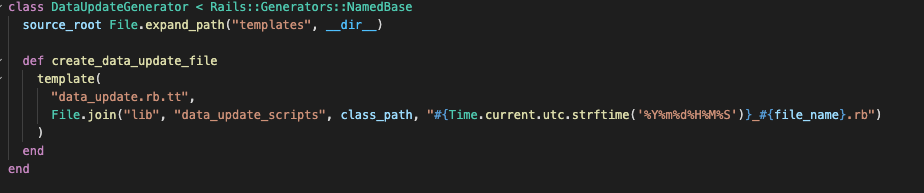
- Create a generator for the data update scripts: We wanted to have the migrations-like feeling of having timestamps. so we added a custom generator to create these files
Path: lib/generators/data_update/data_update_generator
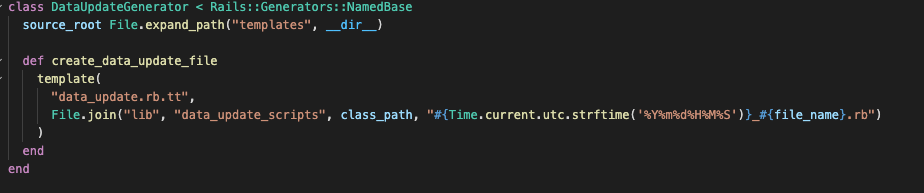
- And for the template that it's going to be used by the generator:
Path: lib/generators/data_update/templates/data_update.rb.tt
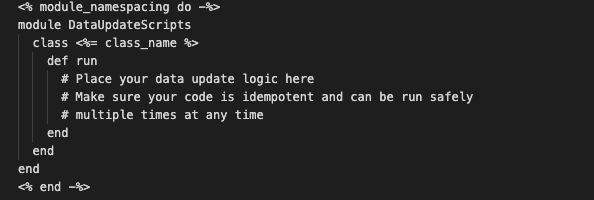
- So now if your run "rails generate data_update ExampleScript" you would expect a file that lives under "lib/data_update_scripts"
- Now we have our generator in place to create the scripts the we will use to update our data. Now we can add a model that will track the activities of these files. We're going to use sidekiq to run these files after 10 minutes of a successful deployment. And this model will track: - When they are enqueued. - When they are running. - When they succeed or fail - How long does each task take That's how our model looks like:
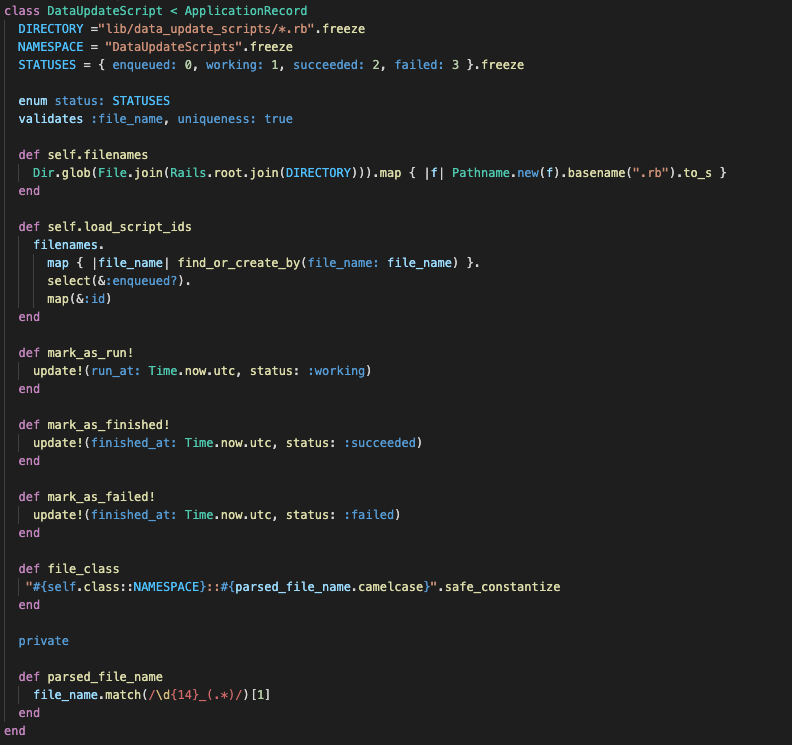 Path: app/models/data_update_script.rb
Schema File

- The model here is responsible to create an object for the new script files in "load_script_ids" and can mark them as run, finished, or failed. Also does parse the file name in "parsed_file_name" to get the file class name that we can use later in our Sidekiq worker
- Now coming to the worker, The worker's responsibility is to run the data update in the background, to not delay the deployment process nor affect other parts of the system. We will also create a task that runs this worker 10 minutes after the deployment is finished Path: app/jobs/data_update_job.rb
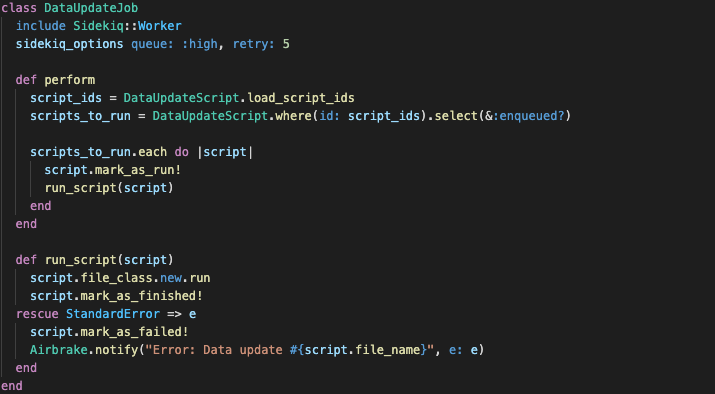
Path: lib/tasks/data_updates.rake
- We run our rake task at the very end of the deployment (after the migrations have been run). We're hosting our app on EBS so that allows us to run scripts like that:
And that's it! No more migrations to do data updates, no more outdated rake tasks or seed files. Every data update now in our system runs automatically, timestamped and logged. I see much potential to use this not only for data updates, but for anything that needs to be decoupled from the deployment process. And there's a big room for improvement still for data updates with that structure
Hope you enjoyed your read, have a good one! <3